Is the Logitech 920-003051 RF Wireless Keyboard a Smart Everyday Pick for Work, Study, and Home Use?
Too many cables, too much desk clutter, and not enough time to fuss with setup—this is exactly where the Logitech 920-003051 helps. It’s a practical RF wireless English keyboard in black for business computers, home offices, education tech, and light IT work. The tiny Unifying receiver can stay in a laptop, which is handy when you move between desks or meeting rooms. See the Logitech 920-003051 keyboard overview. It isn’t flashy, but simple often wins, especially as buyers choose reliable, budget-friendly peripherals for laptops, servers, and DHE MyShop-style lists. If simplicity is the goal, see the Logitech 920-003051 specs. Logitech’s official product support can be useful for confirming compatibility and warranty details.
What You Actually Get: Core Specs That Matter
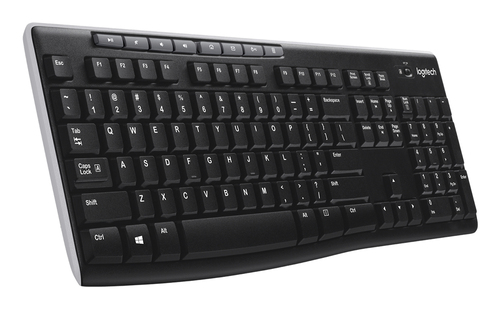
The Logitech 920-003051 keeps the essentials front and center. You get an RF wireless connection, an Advanced 2.4 GHz link, and a claimed 10-meter range, which in plain terms means cord-like reliability without the cord. That matters more than people think. In a busy office, classroom, or shared desk, a flaky connection can turn a simple typing task into a minor headache. Auto-frequency switching helps the keyboard dodge interference, and 128-bit AES keyboard encryption adds a reassuring layer of security for business computers and education technology environments.
The English layout and black finish give it a clean, professional look that fits into almost any workstation. One of the best practical touches is the Unifying receiver. A single tiny USB dongle can support multiple compatible Logitech devices, so you’re not filling laptop bags and dock stations with random adapters. That’s a small detail, but it really adds up in everyday use. If you want the technical side laid out clearly, the Logitech 920-003051 technical details page is worth a look. Still, this is a straightforward keyboard, not a feature-heavy gaming board or a customizable productivity monster. And that’s fine. For typing, admin tasks, spreadsheets, and system monitoring, reliability usually beats extra bells and whistles. In IT solutions environments, predictable wireless performance matters more than RGB lighting or macro layers. I’d take stable input over fancy extras almost every time.Battery Life and Wireless Stability: Why They Save Time
The 24-month battery life is one of those specs that sounds nice on paper and then becomes genuinely valuable in real life. Fewer battery changes mean less downtime, fewer interruptions, and less “who has spare batteries?” drama. Add auto standby and the lack of an on/off button, and the keyboard quietly manages power for you. That’s the kind of design choice people usually appreciate after a few months, not on day one.
In my experience, a keyboard that just works is worth more than a fancy one that needs constant charging. Busy environments make that even clearer—offices, classrooms, shared workstations, and rooms packed with servers, storage gear, or GPUs can all create enough electromagnetic noise to annoy weaker wireless devices. The Logitech 920-003051 battery and wireless info at this product page is a good reminder that endurance and stability are real productivity tools, not just spec-sheet filler. Premium options aren’t always the better value when the job is basic, dependable input for emails, reports, admin consoles, and customer support systems. That’s especially true during back-to-school seasons or year-end refresh cycles, when bulk purchasing decisions and DHE MyShop procurement workflows need predictable costs. Wireless security also matters more than many shoppers expect, particularly in workplaces handling sensitive information. If you’re trying to keep things smooth and low-maintenance, this keyboard makes a strong case for itself.Hot Keys and Everyday Productivity: Small Shortcuts, Big Payoff
The eight hot keys are where this keyboard starts saving little bits of time all day long. You get quick access to Internet, email, play/pause, volume, and similar functions, which sounds simple until you realize how often you use them. A second here, a second there—it adds up. For office staff, students, and general users, fewer clicks usually means less friction and a smoother flow.
Picture this: you’re moving between a spreadsheet, a browser, and a conferencing app. Those shortcuts make the whole setup feel more natural, almost like the keyboard is quietly getting out of the way. The Logitech 920-003051 hot keys and workflow features are especially useful in education technology labs, hot desk environments, and basic business computers where speed matters more than customization-heavy software. That’s the everyday reality most people live in. Of course, this isn’t a full macro board, so advanced power users or gamers may want something more specialized. But for the general audience, that’s usually okay. The everyday work focus covered in this detailed review lines up well with how these shortcuts actually feel after a week or two. I remember noticing it myself—once hot keys become habit, going back to a bare-bones board feels oddly slow.Setup, Portability, and Where It Fits Best
Setup is refreshingly simple. Plug the wireless receiver into a USB port, wait a moment, and start typing—no software required for basic use. That’s a big win for people who don’t want a complicated install process, and it’s even better in IT support scenarios where time matters and repeatable deployment is key. The setup and portability notes for the Logitech 920-003051 setup and portability notes make it clear why this keyboard is popular in practical environments.
It fits best in desktop workstations, laptops used for hybrid work, classroom labs, front-desk stations, and temporary office setups that get reconfigured often. The tiny receiver can stay in a laptop bag, which is handy for travel or remote work. A few best practices help too: keep the receiver in a stable USB port, avoid crowded hub chains if you can, and test range in the actual room before rolling it out widely. That little bit of prep saves trouble later. There are limits, sure. No dedicated wrist rest, no premium mechanical feel, and no flashy extras. But many users won’t care. For practical buyers, the broader value discussion in this smart-buy perspective reinforces why simple peripherals often win in budget-conscious IT solutions and business computer purchases. In other words, this keyboard is less about excitement and more about making work feel easy.Honest Review: Strengths, Trade-Offs, and Who Should Buy It
The Logitech 920-003051 is easy to recommend if you want dependable basics. Its strongest points are reliable RF wireless performance, long battery life, secure encryption, easy setup, and the convenience of the Unifying receiver. Those features make it a solid fit for daily typing, office work, school use, and light administrative tasks. I’d especially trust it in places where downtime is annoying and unnecessary.
The trade-offs are just as clear. It’s basic, the English layout may not suit everyone, and users who want premium ergonomics, mechanical switches, or deep customization will probably want something else. That said, the fact that it doesn’t try to be everything to everyone is part of the appeal. A finance assistant at a business computer, an IT admin near a server rack console, or a student in a shared dorm setup could all get real value here. The Logitech 920-003051 honest product assessment boils down to this: buy it if you care more about stability, simplicity, and long battery life than extra features. Sometimes the best peripherals are the ones you forget about because they never get in the way.How to Set It Up and Use It Without Hassle
Start by unboxing the keyboard and finding the tiny Unifying receiver. Step 1: plug it into an available USB port on your desktop, laptop, or netbook. Step 2: wait for the operating system to recognize it; in many cases, the keyboard is ready right away. Step 3: type a few test lines and try the hot keys for volume or media controls.
Step 4: place the keyboard at a comfortable angle on a clean, flat surface. Step 5: if you plan to use additional compatible Logitech devices, pair them through the Unifying ecosystem. Step 6: keep an eye on battery status over time and rely on auto standby to conserve power. In education technology labs, shared business computers, and IT solutions teams managing many endpoints, that simple workflow saves time fast. A couple of best practices help: avoid metal obstructions, keep the receiver close to the workstation, and test wireless range in your actual environment before deploying it across multiple desks. If the keyboard seems laggy, try another USB port or reduce wireless interference from nearby devices. It’s a small fix, but often that’s all it takes.Conclusion
The Logitech 920-003051 is a no-nonsense RF wireless keyboard that puts reliability, battery life, security, and convenience first. For a lot of people, that’s exactly the right formula. You don’t always need premium materials, deep customization, or a mechanical feel to get real work done. Sometimes you just need a keyboard that connects quickly, types cleanly, and stays out of the way. That makes it a smart buy for workplaces, schools, home offices, and anyone building a practical setup for business computers, server-side admin stations, or education technology environments. The black finish and English layout keep it professional and easy to place in almost any setup. And honestly, that understated look is part of the charm—it blends in instead of demanding attention. Premium gear can be great, no question, but it isn’t always worth it if your workflow is mostly typing, navigating, and moving fast. If that sounds like you, this keyboard is worth a serious look. It’s the kind of peripheral that disappears into the background in the best possible way. When you’re ready, review the Logitech 920-003051 details again and decide whether simple is the smartest choice for your desk.
Frequently Asked Questions
Common questions about Logitech 920-003051 keyboard RF Wireless English Black