Is the Logitech 920-003051 Wireless Keyboard Still a Smart Buy for Everyday Work?
If you’ve ever wanted a keyboard that just works without adding desk clutter, the Logitech 920-003051 usually makes sense. This simple black RF wireless model is built for everyday users who care more about stability than flashy extras. In IT settings—business computers, education technology labs, and fast workstation setups—small things like receiver size and battery life matter more than most people think. See the Logitech 920-003051 product details and this Logitech 920-003051 wireless keyboard, plus Logitech’s official product page. Wireless range, Unifying convenience, hot keys, and easy setup still fit today’s hybrid work and DHE MyShop-style buying decisions. So, does simple beat premium?
What You Get: Core Features That Keep It Practical
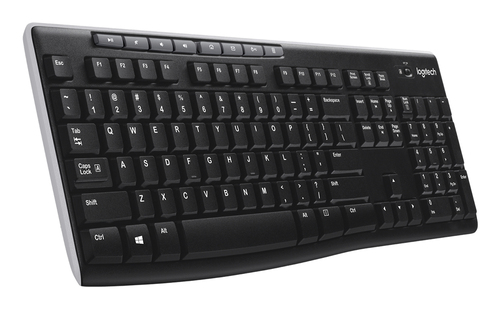
The Logitech 920-003051 keeps things straightforward: RF wireless connectivity, an English layout, a black finish, and the tiny Logitech Unifying receiver. That receiver is small enough to live in a laptop port, which is a real win if you bounce between offices, classrooms, and home desks.
You can also pair other compatible devices to the same receiver, like a mouse or number pad, so you cut USB clutter and free up limited ports on business computers. It uses 2.4 GHz wireless with a claimed 10-meter range, though in my experience it performs best in normal office layouts, not through several walls. Auto-frequency switching and 128-bit AES keyboard encryption are quietly useful for IT solutions and shared workspaces where reliability and basic security matter. Setup is plug-and-play, no software required, which helps when you’re deploying keyboards on servers, storage rooms, or education technology carts and time is tight. If you want the finer points, the specs and compatibility details show how practical this board really is. It’s not flashy, and that’s the point: fewer headaches, more consistency.Why Battery Life and Wireless Stability Make a Bigger Difference Than You Think
A 24-month battery life is one of the biggest selling points here, especially if you hate constant maintenance. Cheaper keyboards often look fine on paper, then burn through batteries or lose connection at the worst time.
From an IT perspective, I’ve seen how even one less battery swap per unit adds up across a department. That’s real labor saved, not just a spec sheet number. Auto standby helps keep power use low, and the lack of an On/Off button isn’t a drawback because the keyboard manages itself. Meanwhile, advanced 2.4 GHz connectivity, automatic channel switching, and reduced signal loss matter in crowded wireless environments full of Wi‑Fi, Bluetooth headsets, and nearby peripherals. That matters in office buildings, business computers, and education technology labs where a flaky input device can stall a whole workflow. Honestly, premium options aren’t always worth it. Sometimes a basic keyboard with stable performance is the better buy. The long battery life and wireless reliability make this feel like a set-it-and-forget-it device, which is exactly what many users want.Hot Keys, Daily Productivity, and Where It Fits Best
The eight hot keys are where this keyboard starts paying for itself in small daily wins. Launch email, open the internet, adjust volume, hit play/pause… those shortcuts shave seconds off routine tasks, and that adds up.
For students, remote workers, and office staff, the layout is familiar enough that there’s usually no learning curve. A home office user on calls, a receptionist controlling media, or a classroom workstation needing quick access can all benefit. I also like how simple peripherals often win in IT solutions and procurement because they’re easier to support and standardize across fleets. The English layout and black finish make it a clean fit for mainstream setups, and that matters when you’re trying to keep a workspace consistent. If you liked the everyday-work and home-use breakdown, this model follows the same practical logic. The hot keys and usability details reinforce that this is about speed, not spectacle. It won’t replace a gaming board or a premium ergonomic model, but for general productivity, it does a solid job.How It Stacks Up in Real Life: Value, Trade-Offs, and Alternatives
This isn’t trying to compete with mechanical keyboards, wireless gaming boards, or high-end ergonomic models. It targets people who want dependable wireless typing at a sensible price, plain and simple.
The trade-offs are real: no backlighting, no advanced customization software, and no premium tactile switches. But a lot of users won’t miss those extras. In my experience, that’s often the right call for shared offices, point-of-sale stations, education technology carts, and secondary home-office setups. The compact receiver and single-receiver pairing can be a big plus if you care about cleaner desks and fewer dongles. Premium options can be worth it for niche users, sure, but for general work this kind of keyboard usually delivers better value per dollar. There’s even a subtle sustainability angle here—fewer battery changes and a long service life can mean less waste over time. That said, there’s no built-in rechargeable battery and no advanced macro support, so power users may want something richer. Still, the value-focused product overview shows why this is a smart, practical choice for buyers who care about function first.Honest Review: Strengths, Weak Spots, and Who Should Buy It
My honest take? The Logitech 920-003051 is a dependable workhorse. The biggest strengths are easy setup, stable RF wireless, long battery life, the compact Unifying receiver, and genuinely useful hot keys.
In real life, that means less desk clutter, fewer USB ports used, and an easier rollout across multiple workstations. I’d happily recommend it for office admin work, school labs, and home users who want reliability without spending much. The downsides are just as clear: it’s basic, lacks premium ergonomics and backlighting, and won’t satisfy people who want custom controls or a more tactile typing feel. It’s also not the best pick for heavy gaming or specialized creative workflows. That said, premium gear isn’t always the better purchase. Sometimes the best buy is the one that solves the problem without extra complexity. For general users, small businesses, and IT teams managing low-maintenance peripherals, this is a sensible choice. If you want a statement piece, look elsewhere. If you want something that quietly gets the job done, this fits.How to Set It Up and Use It Without Hassle
Setup is refreshingly simple. 1) Unbox the keyboard and find the tiny Logitech Unifying receiver. 2) Plug the receiver into a USB port on a desktop, laptop, or netbook. 3) Turn the keyboard on if needed, then start typing—basic use usually requires no software.
4) If you add compatible devices later, pair them through the same receiver to keep your workspace organized. 5) Place the keyboard within a practical range and away from heavy interference. A few quick best practices help: don’t stack metal objects near the dongle, test the hot keys early, and keep a spare battery around if you’re setting up several units. Common mistakes? Assuming wireless range is unlimited, or forgetting that some USB hubs can affect performance. Pro tip: if you’re rolling out keyboards across business computers or school labs, label the receivers and document which devices are paired. It sounds small, but it saves time later. Honestly, this is one of those rare peripherals that usually just works, which is exactly why people keep buying it.Conclusion
The Logitech 920-003051 is built for practicality, not hype, and that’s why it still earns attention. Its strongest benefits are the reliable 2.4 GHz wireless connection, 24-month battery life, easy plug-and-play setup, secure Unifying receiver, and hot keys that support everyday productivity. For general users, business computers, education technology setups, and shared workspaces, that combination is hard to beat. In a market full of overbuilt peripherals, a straightforward keyboard can be the smarter purchase—especially when you’re managing IT solutions or trying to standardize devices across a team. I’ve seen plenty of premium keyboards look impressive but solve fewer real problems. Sometimes the best tech is the stuff you don’t have to think about. That’s the appeal here: fewer cables, fewer surprises, and less maintenance over time. If you need a dependable tool rather than a statement piece, this model deserves a close look. Explore the product details and decide whether this simple everyday keyboard fits your setup.
Frequently Asked Questions
Common questions about Logitech 920-003051 keyboard RF Wireless English Black