Is the DELL Pro 13 Premium Worth It for Portable AI Productivity?
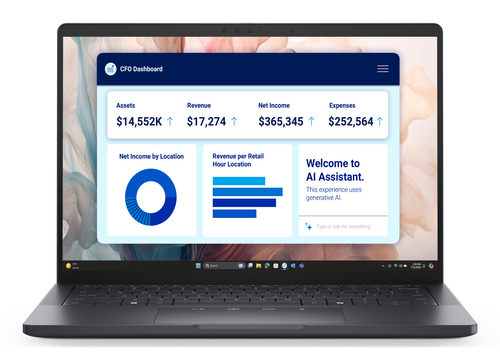
Business laptops are changing fast, and more buyers want something that feels like a travel notebook but works like a full office machine. The DELL Pro 13 Premium PA13250 Copilot+ PC fits that brief with an Intel Core Ultra 5 236V, 16 GB LPDDR5x-SDRAM, 512 GB SSD, Wi-Fi 7, and a 13.3-inch Full HD+ 16:10 IPS screen. See the full hardware overview and the premium collaboration features. But is the price worth it for everyday work?
What the hardware gives you day to day
The Intel Core Ultra 5 236V with 8 cores and Intel Arc Graphics 130V usually feels like the kind of chip combo that quietly gets work done. In my experience, people notice the screen and the silence first, then the speed: browser-heavy days, Teams calls, spreadsheets, and document edits all stay smooth, and light photo work is often fine too. The 13.3-inch Full HD+ 1920 x 1200 IPS WVA panel gives you sharper text and extra vertical room, which makes long work sessions easier on the eyes.
That balance gets helped by 16 GB of LPDDR5x memory and a 512 GB SSD. Apps open quickly, boot times stay short, and switching between tabs or datasets usually feels less sluggish than on older Intel-based business laptops. Windows 11 Pro is another quiet win, especially if your IT team cares about security policies, BitLocker, or device management. I’d call the compact business-ready configuration a sensible sweet spot for many professionals who don’t want to babysit their machine. Compared with bulkier notebooks, this one aims to feel less noisy and more nimble in everyday use. It’s not a workstation, of course, but for email, cloud apps, remote meetings, and standard office work, that’s exactly the point. And that matters when you're hopping between desks or squeezing work into a train ride—less heat, less fan noise, less drama. If you’re comparing it with an older 8 GB laptop, the day-to-day jump usually feels bigger than the spec sheet suggests on login.Why the design and mobility matter more than you think
Design is a productivity feature, even if people forget that until they carry a laptop for a week. The black clamshell chassis and 13.3-inch footprint make the DELL Pro 13 Premium easy to slide into a backpack, and the premium build tends to give it that calm, executive feel that buyers notice in meeting rooms.
The bigger story, though, is quiet operation. When a machine stays cool and doesn’t spin fans constantly, it’s easier to use in libraries, classrooms, client sites, and video calls where every little noise stands out. Add the 60 Wh battery and 65 W charging, and you get a setup that usually works well for travelers and hybrid workers who hate being stuck near outlets. I also like that Wi-Fi 7 and Bluetooth support make the laptop feel future-ready for dense offices, shared campuses, and busy home networks. If your workday is mostly email, video calls, and cloud apps, a compact machine like this often makes more sense than a larger system. Pro Tip: choose portability first when you’re not doing heavy local rendering all day. That portability and design discussion shows why the trade-off can be smart, even if premium options aren’t always the best value for every budget. In retail terms, it’s the kind of laptop you stop thinking about after setup—which is usually the point. You just open it, work, close it, and move on. No fuss, no wobble, no regret. That’s rare at this size for busy pros.How the AI and Windows 11 Pro experience helps real users
Copilot+ PC features can sound flashy, but the useful part is usually simpler: the laptop does more of the small stuff for you. On-device AI can speed up search, help draft notes, summarize meetings, and make common workflows feel more responsive, especially when you’re jumping between apps all day. I’ve seen that matter most in IT solutions, business administration, and education technology roles.
A consultant moving between client meetings, a teacher managing coursework, or an office manager answering Teams calls may only save a few minutes at a time, but those minutes add up. That’s why AI productivity workflows on this model are worth understanding. The Windows 11 Pro and AI-ready feature set also fits managed environments because security, device control, and deployment options are built in. One thing I appreciate: on-device AI often feels most useful when internet access is spotty or when you want quick, private help without sending everything to the cloud. That said, AI isn’t magic. Good prompts, clean file names, and a sensible folder structure still matter more than buzzwords. Used well, the DELL Pro 13 Premium turns AI from a marketing line into a small but real time saver. For many people, that’s the sweet spot: not revolutionary, just genuinely helpful on a Tuesday afternoon when deadlines are tight and the inbox won’t quit. If you’re comparing it with older laptops, the difference shows up in little ways—faster search, fewer clicks, and less waiting between tasks overall, in practice for most.Where it fits in a modern work setup
This laptop fits nicely into a modern mixed fleet, where a company might use desktops for fixed desks, servers for shared services, storage systems for files, and higher-end GPUs for heavier workloads. In that setup, the DELL Pro 13 Premium usually becomes the daily driver for road warriors, managers, educators, and IT staff who need dependable performance without hauling workstation weight.
That balance matters for DHE MyShop shoppers too, because a lot of buyers now want fewer devices that do more. I see that trend everywhere: portable machines are replacing multiple niche devices, especially when wireless, battery life, and collaboration tools are strong enough. Business-ready device choices for hybrid teams fit that same idea. Of course, there are limits. If you need serious 3D rendering, local AI training, or large-scale media editing, a desktop or a more powerful laptop class may be a better fit. But for most knowledge workers, the compact size, fast storage, and modern wireless are more than enough. In that sense, value is the story—not raw power, but the way it reduces friction during a long workday. That’s especially true in sales, education, and operations, where people live in calendars and cloud dashboards. I’d rather carry a lighter machine that opens instantly than a heavier one that promises specs I’ll never use. If your team is standardizing hardware, this kind of compact premium laptop often keeps support simple, too, which IT folks usually appreciate in audits and rollouts later on downstream too.Honest review: strengths, trade-offs, and who should buy it
Here’s my honest take: the DELL Pro 13 Premium PA13250 is a strong premium ultraportable, but it makes sense only if you’ll use what you’re paying for. The wins are easy to spot—very light to carry, a premium black chassis, a sharp 13.3-inch display, quiet cooling, Wi-Fi 7, Windows 11 Pro, and AI-ready features that make day-to-day work feel smoother. The 16 GB LPDDR5x memory and 512 GB SSD combo also give it that “no fuss” feel people want from a business laptop.
The trade-offs are real, though. Upgrade flexibility is limited, integrated graphics are fine for office work but not for heavy gaming or editing, and the price may feel steep if you’re shopping purely on specs. In real life, I’d recommend it for consultants, executives, students in education technology, and IT professionals who move around a lot. If you’re mostly desk-bound, a cheaper business laptop might be smarter. Premium laptops are worth it when they cut friction—less waiting, less noise, less clutter—and this one does that well. I’d call it a good buy for people who feel those small delays every day, because that’s where the premium usually pays back fastest in practice.How to get the best first-day setup
Start simple. 1) Unbox the laptop, connect the 65 W charger, and let it top up before a long first session. 2) Finish Windows 11 Pro setup, sign in with a Microsoft or work account, and connect to Wi-Fi 7 if it’s available. 3) Run Windows Update and Dell support tools so drivers, BIOS, and security patches are current.
4) Adjust display scaling, power settings, and battery saver options to match your work style. 5) Set up Copilot+ features, Office apps, browser favorites, and video conferencing tools. 6) If this is part of an IT rollout, enroll it in device management, apply security policies, and verify encryption. Common mistakes to avoid: skipping updates, leaving default power settings untouched, or filling the SSD too quickly. Keep at least 15–20% storage free for smoother performance. Easy Solution: if battery life feels short at first, check background apps and brightness before assuming anything is wrong. That small tweak often fixes the “my new laptop is draining fast” panic. If you’re rolling this out for a team, standardize the first-day checklist; it saves support tickets later. And don’t forget a quick test call, just to confirm audio, camera, and Wi-Fi are behaving.Conclusion
Bottom line: the DELL Pro 13 Premium PA13250 is built for people who want a compact, quiet, modern business laptop that feels ready for AI-assisted productivity. The standout pieces are easy to like: portable design, a sharp 13.3-inch Full HD+ screen, Intel Core Ultra performance, 16 GB memory, 512 GB SSD storage, Wi-Fi 7, and Windows 11 Pro.
The honest caveat is that this is a premium machine, so the value shows up most when mobility, battery confidence, and collaboration matter in your daily routine. It suits professionals, mobile teams, and education users especially well. Power users who need heavy graphics, big local projects, or workstation-class hardware should probably keep shopping. My advice? Compare your actual workload against the machine’s strengths before buying. If your day is full of meetings, travel, cloud apps, and quick AI-assisted tasks, this laptop can feel like a smart long-term investment. And if you want to verify the specs before deciding, take one last look at the full product details and see whether it matches the way you really work. That’s the kind of purchase that usually ages well, at least in my experience, because it solves friction instead of adding it.Frequently Asked Questions
Common questions about DELL Pro 13 Premium PA13250 Copilot+ PC Intel Core Ultra 5 236V Laptop 13.3" Full HD+ 16 GB LPDDR5x-SDRAM 512 GB SSD Wi-Fi 7 (802.11be) Windows 11 Pro US English Black