Is the DELL Pro 13 Premium PA13250 the Right Copilot+ PC for Portable AI Productivity?
Business users usually want more than a thin laptop; they need a machine that can handle AI-assisted workflows, long days away from the desk, and video meetings. The DELL Pro 13 Premium PA13250 is a Copilot+ PC built for mobility, quiet operation, and collaboration. Its 13.3-inch Full HD+ 16:10 display, Intel Core Ultra 5 236V, 16 GB LPDDR5x, 512 GB SSD, and Windows 11 Pro set the baseline. Is it an upgrade? See product details and full DELL Pro 13 Premium configuration.
What the hardware actually gives you day to day
At a practical level, the Intel Core Ultra 5 236V is the part that makes this laptop feel modern instead of merely slim. With its 8-core design, it usually handles multitasking, Office apps, browser tabs, light creative work, and Windows 11 Pro’s on-device AI features without sounding stressed. Intel Arc Graphics 130V is integrated, so you’re not buying a gaming beast here, but for presentations, streaming, charts, and everyday visuals, that’s often enough.
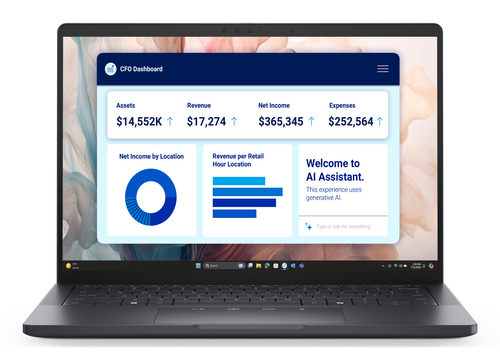
The 13.3-inch 1920 x 1200 IPS WVA panel in a 16:10 format is one of those small upgrades that ends up mattering a lot. You get a bit more vertical space, which helps with spreadsheets, documents, and web work. Add 16 GB LPDDR5x memory and a 512 GB SSD, and the system feels responsive: fast boot times, quick app launches, and enough storage for typical business files. Wi-Fi 7 and Bluetooth make it feel ready for newer office networks and education technology setups too. If you’re comparing premium endpoints, this technical specs and business-ready hardware page is worth a look, because not every spec bump translates into real value. Quick Wins: the 60 Wh battery and 65 W charging support people who spend most of the day moving between meetings, cafés, and shared workspaces.Why the design and mobility matter more than you might think
The black clamshell design is understated in a good way. It looks professional, doesn’t scream for attention, and slides into a bag without feeling like a showpiece. For commuters, consultants, field teams, and managers who bounce between offices, that lightweight 13-inch class form factor is a real quality-of-life upgrade. I’ve found that people don’t always notice quiet operation until they sit through a meeting or work in a library; then it becomes a big deal.
Dell’s portability-first setup also makes sense for hybrid work, where you may be at home in the morning, on a train at lunch, and in a client room by afternoon. The all-day battery claim is attractive, though in my experience premium ultraportables usually do best when you keep brightness sensible, trim background apps, and don’t treat back-to-back video calls like a casual test. That said, the collaboration side matters too: camera, mics, speakers, and Windows 11 Pro meeting tools all support a smoother workday, even if we’re not inventing specs that aren’t listed. For buyers comparing mobility-focused configurations, portable Copilot+ PC setup is the natural reference point. And if you want desk comfort after travel, pairing it with a reliable wireless keyboard workflow can make the whole setup feel much closer to a full workstation. For IT teams, that kind of mobility often reduces onboarding friction and remote-support headaches.How the AI and Windows 11 Pro experience can help real users
Copilot+ PC branding sounds a bit flashy at first, but the practical idea is simple: this laptop is designed to use on-device AI features to speed up everyday work and keep responses snappy without sending everything to the cloud. Think note summaries, first-draft emails, meeting recaps, smarter search, and those little workflow shortcuts that save five minutes here and there.
Windows 11 Pro adds the business-friendly layer on top—security controls, management options, and compatibility that IT administrators usually care about when they’re rolling out business computers across a team. For privacy-conscious users, local AI processing can be appealing because sensitive information doesn’t always need to leave the device. That’s one reason the category is getting attention from companies with stricter data policies. If you want Dell’s broader positioning and support ecosystem, the Dell official website is the best vendor source to review. In real work, the value is usually cumulative: a premium display, modern connectivity, and AI readiness shave off friction in small ways that add up over the week. Older laptops often feel slower when you’re juggling meetings and tabs. Still, the point isn’t magic; it’s smoother daily work. For buyers verifying the configuration, the Copilot+ PC product listing helps confirm the exact package before you commit.Where this laptop fits—and where it might not
This is a strong fit for executives, consultants, remote workers, sales teams, traveling professionals, and even higher-ed staff who want a premium but manageable device. It handles presentations, document work, browser-heavy workflows, and light editing well enough for most office days. IT departments may also appreciate the Windows 11 Pro baseline, Wi-Fi 7 readiness, and a hardware profile that is easier to standardize across fleets.
There’s even a broader purchasing context here: buyers refreshing endpoints are often also thinking about servers and storage as part of a wider IT solutions stack. But let’s be honest—this isn’t the machine for heavy 3D rendering, workstation-class gaming, or someone who wants a desktop replacement with lots of thermal headroom. If you’re comparing form factors, the durability and classroom-ready approach of education laptops solves a very different problem than this premium executive notebook. Budget buyers may also find better value in a simpler notebook if on-device AI and top-tier portability aren’t priorities. Premium options aren’t always worth it for everyone. In my experience, they make sense when the workflow actually benefits from polish, speed, and travel-friendly comfort. Otherwise, you may be paying for features you barely use.Honest review: strengths, trade-offs, and who should buy it
My honest take: the DELL Pro 13 Premium PA13250 has a lot going for it. The portability is excellent, the build feels premium, the 16:10 display should be sharp and practical, and the mix of CPU, LPDDR5x memory, and SSD storage is well matched for business productivity. Modern connectivity and the on-device AI angle also feel forward-looking, which matters if you want a laptop that won’t feel dated too quickly.
The trade-offs are predictable for a compact system: fewer creature comforts than larger laptops, less room for demanding graphics work, and less thermal headroom than a thicker machine. For traveling managers, hybrid employees, and people who live in Office apps, browser tabs, email, and video meetings, though, it sounds like a very sensible choice. It is especially compelling in standardized business computers fleets where security and consistency matter. I usually tell people not to overspend unless the workflow justifies it. If that workflow includes frequent travel, meeting-heavy days, and a desire for a polished Copilot+ PC, this one earns a serious look. If your main goal is maximum performance per dollar, I’d keep shopping. review the exact configuration here.How to set it up for the best first-day experience
Here’s how I’d set it up on day one, the same way I’d prep it for a user on an IT team. Step 1: unbox the laptop, plug in the 65 W charger, and let it charge fully before you start pushing it hard. Step 2: finish Windows 11 Pro setup, join Wi-Fi 7, sign in with the right account, and install updates right away.
Step 3: open Device Manager and Dell support tools, then check firmware, driver, and security updates so you don’t chase stability issues later. Step 4: tune power, display, and privacy settings for your balance of battery life and performance. Step 5: pin your everyday apps, set up OneDrive or your preferred storage flow, and test the webcam and mics before an important meeting. Step 6: if this is a rollout, enroll it in MDM and confirm policies. Common mistakes to avoid: skipping updates, keeping brightness maxed out, and forgetting to test audio. If you want a more comfortable mobile desk, the wireless keyboard workflow is a smart accessory pairing.Conclusion
The DELL Pro 13 Premium PA13250 is a thoughtfully built Copilot+ PC for people who care about portability, professional polish, and modern AI-ready hardware. The strongest parts are easy to see: Intel Core Ultra 5 236V performance, 16 GB LPDDR5x, 512 GB SSD storage, Wi-Fi 7, Windows 11 Pro, and that 13.3-inch Full HD+ 16:10 display.
In plain language, it helps you work comfortably, travel lightly, and stay productive without feeling like you’re dragging around a brick. Premium laptops can absolutely be worth it when they reduce friction and save time day after day—but only if you’ll use those advantages regularly. For business professionals, hybrid teams, and IT-managed fleets, this looks like a very strong fit. For budget buyers or heavy performance users, less so. My advice is simple: compare the exact setup to your workflow, your support needs, and your travel habits. If it lines up, the see the full product details page is the best place to take the next step.Frequently Asked Questions
Common questions about DELL Pro 13 Premium PA13250 Copilot+ PC Intel Core Ultra 5 236V Laptop 13.3" Full HD+ 16 GB LPDDR5x-SDRAM 512 GB SSD Wi-Fi 7 (802.11be) Windows 11 Pro US English Black