How to Choose the Perfect Keyboard for Your Needs
Keyboards are integral to our daily and business computing tasks. Whether working in IT solutions, managing servers, or engaging in education technology, the right keyboard can make a world of difference. As we dive into this guide, you’ll discover how to choose a keyboard that not only meets your needs but also enhances your overall computing experience. From various features to benefits and specific use cases, we'll help you make an informed choice with confidence.
Understanding Keyboard Types
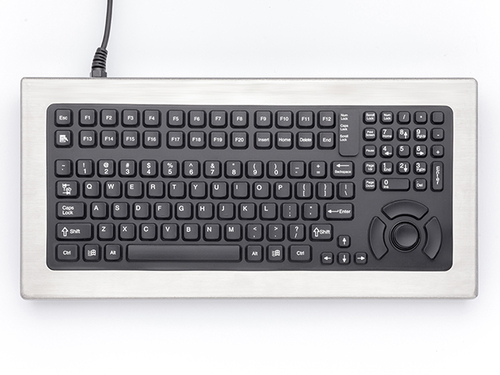
Navigating the world of keyboards can feel overwhelming given the variety of options, but understanding the types can ease your decision-making. Among the options are mechanical, membrane, ergonomic, and wireless keyboards. Mechanical keyboards are prized for their tactile feedback, often favored in gaming and typing-heavy professions. The click of a mechanical key press might remind you of typewriters—a sound loved by many enthusiasts.
On the other hand, membrane keyboards are typically quieter, with a soft press that suits casual users or open office environments where noise is a concern. Ergonomic keyboards are designed to promote comfort, often featuring a unique shape that reduces the strain of long hours typing—something I've come to appreciate after countless hours of code. Then there are wireless keyboards, offering freedom from cables and fostering a cleaner desk setup. However, one must consider potential latency issues, especially when precision is required, such as in server management settings. You’ll often find that business computers and certain storage solutions have a strong leaning toward specific types due to these varying benefits, underscoring the importance of understanding your specific needs.Key Features and Specifications
Delving into keyboard features, key switch types, backlighting, and connectivity can significantly impact your experience. For starters, key switch types—linear, tactile, or clicky—determine the feel of each keystroke, affecting typing speed and accuracy. A tactile switch, for example, provides a distinct bump, offering satisfying feedback with each press—useful for writers or programmers who spend hours typing.
Backlighting is another alluring feature, transforming mundane keystrokes into a visually pleasing experience. It's especially handy in dim environments, often making it a staple choice in creative settings like design studios. Meanwhile, the wireless vs. wired debate is all about form and function. Wired setups typically offer stability and minimal latency, crucial for GPU-intensive tasks, whereas wireless allows more freedom and less clutter. Personally, I adore the flexibility wireless offers, though I've noticed it's best suited for setups where speed isn’t paramount. Whether setting up a business workstation or customizing a home office, understanding these specs helps tailor the keyboard to your professional environment—facilitating productivity and enhancing the workspace.Benefits and Value Propositions
Investing in a high-quality keyboard can yield numerous benefits, from improved productivity to ergonomic comfort. A well-constructed keyboard enhances typing speed and accuracy, essential for both casual users and professionals in tech-heavy fields like IT solutions or storage management. The feeling of a responsive key under your finger can make all the difference, particularly during intense work sessions.
Meanwhile, ergonomic designs aim to reduce hand strain, an attribute often undervalued until unbearable discomfort sets in. In my experience, ergonomic keyboards have saved many colleagues from strain-related injuries. They truly cater to our natural typing posture, contributing to well-being and efficiency. However, it’s worth mentioning that going premium isn’t always necessary. Occasionally, simpler models can deliver nearly the same utility at a more accessible price point. The durability of a good keyboard can’t be understated either, saving costs in the long run. This discussion on features we’ve explored is key to maximizing your investment, ensuring a harmonious blend of comfort, performance, and budget.Practical Applications and Use Cases
Imagine an office buzzing with keystrokes or a gamer deep into a virtual world—different scenarios where keyboard features shine. For instance, office keyboards prioritize comfortable, quiet typing, balancing function and form. Membrane keyboards are often the go-to here due to their soft touch and affordability.
Conversely, a gaming setup can thrive with mechanical switches due to their tactile feedback and faster key response, crucial during those intense gaming marathons. Backlighting in these keyboards also serves dual purposes: aesthetics and utility in dark environments. Meanwhile, in educational settings, sturdy and straightforward keyboards cater to durability and ease of use, becoming integral when paired with interactive displays or student laptops. In my own experiences managing business servers, a well-chosen keyboard significantly enhances the overall computing ecosystem. It’s fascinating how the right keyboard can be pivotal, streamlining tasks in business servers, enhancing user interaction, and adapting to various needs. These practical applications illustrate how aligned choices can elevate your entire setup, whether for leisure or business.Comparing Leading Keyboard Options
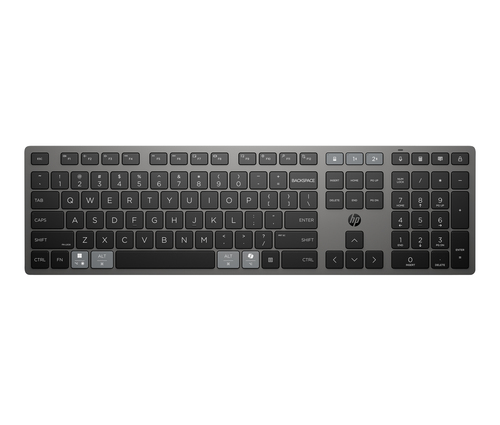
When inspecting the Humanscale Keyboard Systems Platform against the HP 725 Multi-Device Rechargeable Wireless Keyboard, we enter a realm of distinct features and use cases. Humanscale's platform is built for ergonomic excellence, making it a fantastic choice for those setting up a tailored workstation. Its design minimizes strain, aiding those spending long stretches typing away at business reports.
On the flip side, the HP 725 offers the convenience of multi-device connectivity—a superb option for those juggling between computers and tablets. This feature is particularly effective for professionals who need fluid transitioning between devices. To explore the humanscale ergonomic benefits and HP's versatile connectivity, consider how each could fit into your workspace. Both options provide unique advantages, tailored to specific, though sometimes overlapping, needs.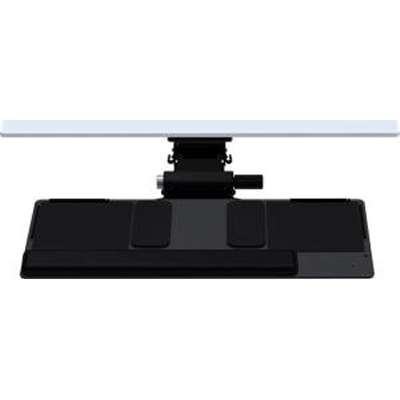
How to Choose the Right Keyboard
Choosing the perfect keyboard extends beyond just specs; it’s about personal fit and function. Start by considering what typing comfort means to you—do you prefer a certain key pressure? Next, think about intended use: Is it for a bustling office, gaming, or something else? And don't forget budget constraints; sometimes, a mid-range keyboard meets needs perfectly.
Testing keyboards in-store or online isn't a bad idea, allowing you to feel key travel and weight firsthand. It's surprising how tangible testing can impact your choice—I've seen it time and again! Avoid common pitfalls, like neglecting key layout or not checking customization options. Learn more about ergonomic design’s impact on productivity. Weigh these tips carefully, blending your needs with comfort and budget to find that ideal match.Conclusion
In wrapping up, the journey to selecting a keyboard presents abundant choices, yet informed decisions hinge on understanding features and matching them with your unique needs. Whether you're scouring options for ergonomic comfort or seeking sleek wireless setups, recognizing how your environment influences choice is crucial.
Remember, even minor upgrades can yield significant boosts in productivity, typing satisfaction, and ergonomic benefits. It’s been repeatedly observed that trial and error fosters the best learnings, nudging you towards understanding what truly works for you. So, delve deeper into these insights—experiment and adapt as needed. And when you're ready for more comparisons and tech details, remember just how powerful the role of a good keyboard can be in enhancing your overall computing experience. Let’s optimize and enrich your typing journey together.Frequently Asked Questions
Common questions about Keyboards