Are You Missing Out on These Essential Computer Accessories?
When setting up a new computer, it's easy to overlook essential accessories that can enhance both functionality and comfort. Ever found yourself hunched over a laptop with a sore wrist or struggling with webcam angle during an important video call? It happens more often than you'd think. This blog will guide you through often-missed accessories, focusing on features, benefits, and practical use cases that can transform your computing experience.
Must-Have Accessories for Every Computer User
In today's world, external keyboards and mice have become more than just basic add-ons for our computers. Their ergonomic designs typically help reduce strain during long hours of work or gameplay. I've personally felt the difference, especially with keyboards that have adjustable feet and tactile feedback. When you're constantly typing, a keyboard that supports your wrists can be a game-changer. External mice, especially those with programmable buttons, can significantly speed up navigation.
Webcams, another essential, often fly under the radar until you find yourself squinting at a fuzzy image during a Zoom meeting. An HD webcam can drastically improve video call quality, making communication more effective. And let's not forget connectivity options; some models offer versatile Bluetooth capabilities or plug-and-play USB setups. Higher-end models provide sharper images and autofocus, but budget options can also perform quite well.Increased productivity is a major advantage of using these accessories. You'd be surprised at how a quality mouse can streamline tasks like editing or browsing. Regardless of whether you opt for budget-friendly versions or splurge on a high-end model, investing in essential accessories is a decision you'll seldom regret. For more insights into choosing the right tools,consider our guide on enhancing tech setups.Enhancing Portables: Accessories for Laptops and Tablets
If you're a laptop or tablet user, consider accessories like docking stations and portable chargers vital in enhancing your device's capabilities. Docking stations serve as a bridge, offering additional connectivity that transforms your portable device into a full-fledged workstation. In my experience, having multiple USB ports, HDMI outputs, and Ethernet interfaces condensed into a single device is invaluable, especially when working remotely.
Portable chargers are another accessory that you shouldn't overlook. These are designed for travel and unforseen battery events, ensuring your devices stay powered throughout the day. If you've ever been caught off guard by a red battery icon while mid-presentation, you'd appreciate their convenience. High-capacity models typically fast charge your devices multiple times, and many are compact enough to slip into a backpack alongside your devices.Compatibility is key, so ensure the accessory matches your device model. This ergonomic design approach is integral to maintaining a comfortable work environment. Whether at a café or an airport terminal, the right accessories undoubtedly make the portable computing experience significantly more efficient and pleasant.The Role of Storage Solutions in Enhancing Computer Performance
Storage solutions such as external HDDs and SSDs often play a critical role in expanding computer performance. Think of these as your digital filing cabinets, where you can securely store, organize, and access vital data effortlessly. SSDs, with their impressive read/write speeds, typically offer much faster data retrieval compared to traditional hard drives. In my work, having an SSD for running applications directly off the drive significantly decreased load times.
External drives are available in countless capacities and form factors, from pocket-sized options to larger drives designed to sit on your desk. They're a lifesaver when it comes to backing up important files securely, providing peace of mind in case of unforeseen data loss. On the flip side, while some may prefer cloud storage solutions for their ease of access from any device, an external drive still offers faster access and no reliance on internet connectivity.For those considering enhancing their storage capabilities, it's crucial to weigh options. Factors like portability, speed requirements, and connectivity should guide your choice. For more specifics on storage solutions, our category guide offers a comprehensive look at what's available.Power Up: Charging and Power Accessories You Can’t Overlook
Charging accessories such as USB hubs and power banks often play pivotal roles in keeping your devices juiced up and ready to perform at their best. With multi-port USB hubs, for instance, you can power multiple devices, making them a versatile addition to any tech setup. Such devices with fast-charging capabilities are not just practical, they're essential during travel. I recall a business trip where my smartphone's battery unexpectedly drained, and my power bank was the hero of the day.
Power banks come in a range of capacities, designed to provide quick top-ups or even full charges several times over. They implement eco-friendly options, including solar-powered models that cater to environmentally conscious users. Meanwhile, understanding compatibility with your devices is crucial for any power accessory. There are many different standards and cable types, so a little research can save you future inconveniences.When considering power and charging accessories, the focus should be on functionality and reliability. Having these tools at your disposal ensures there's never a moment when you're left powerless. For insights into making greener tech choices, explore industry standards and options.Product Comparison: Laptop Holder vs. Tablet Case
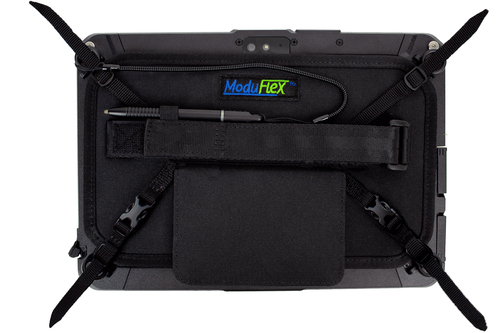
When evaluating accessories, comparing a Gamber-Johnson 7170-0586 holder with an InfoCase FM-MFX-ZX10 tablet case provides an interesting dichotomy. The Gamber-Johnson holder, with its heavy-duty mounting base, is designed for those who need a stationary setup with adjustable viewing angles, offering ergonomic comfort and stability for laptop users. Meanwhile, the InfoCase presents a lightweight solution tailored for tablet users, emphasizing brand compatibility with Getac and providing screen protection for those constantly on the move.
Each product serves distinct use cases: the Gamber-Johnson excels in a stationary work environment, helping reduce neck strain during prolonged use, while the InfoCase shines in mobile scenarios where quick, protective access is beneficial. Exploring these comfort features we discussed earlier aligns perfectly with these comparisons. Align your choice with your specific requirements to maximize comfort and utility.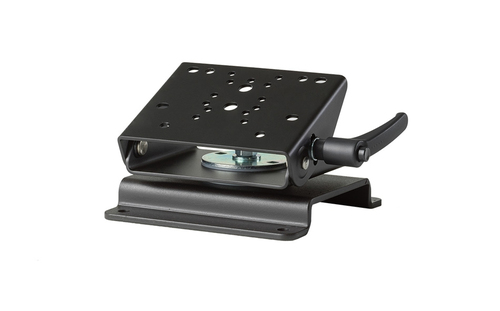
How to Choose the Right Accessory for You
Choosing the right accessory involves a thoughtful process. Start by identifying the primary purpose—be it work, travel, or gaming. It significantly narrows down your options. Next, ensure compatibility; an accessory that's perfect in all other ways won't be of any use if it doesn't work with your gear. Other considerations include budget constraints and brand preferences—to ensure longevity and quality.
As you deliberate, ask yourself rhetorical questions like, 'Will this improve my daily workflow?' or 'Is this a long-term investment?' Reviews and product specs offer invaluable insights; never underestimate the power of firsthand experiences shared by other users. Moreover, consider if you anticipate needing similar accessories down the line, which can help justify a slight increase in budget for a higher-quality product. Small decisions lead to substantial improvements in your tech experience.Conclusion
Throughout our exploration of essential computer accessories, one fact stands clear: the right accessory, tailored to your needs and lifestyle, can profoundly enhance your computing experience. Investing in these peripherals—be it for comfort, convenience, or performance—often translates into increased productivity and satisfaction. Remember, these enhancements don't always require a hefty price tag; even modest investments can yield remarkable benefits.
Consider small purchases like the hands of a clock, moving incrementally yet leading to significant progress over time. It's easy to overlook these 'unsung heroes' in favor of more prominent tech upgrades, but their value is undeniable. Explore your options, don't shy away from experimenting, and be mindful of budget considerations. For more options, take a look at our comprehensive category offerings to find the best match for your setup.Frequently Asked Questions
Common questions about Accessories