Is the Cisco Business 220 Series Smart Switch the Right PoE Upgrade for a Growing Network?
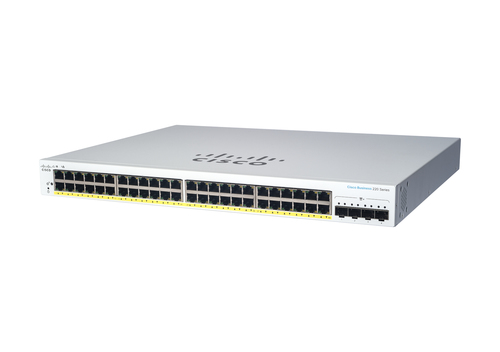
Growing offices, hybrid work, and a pile of connected devices can expose cheap switches fast. The Cisco Business 220 Series Smart Switches offer a managed Layer 2 Gigabit Ethernet option that fits modern IT solutions without feeling overbuilt. You can confirm the full specs and port count on the Cisco Business 220 Series Smart Switch details. With 48 RJ-45 Gigabit ports, PoE support, 8192 MAC entries, 104 Gbit/s switching capacity, and a rack-mountable design, it’s a practical upgrade for business computers, servers, storage, GPUs, and education tech. In my experience, the best switch purchases are the ones you only notice because everything runs smoothly—less bottlenecking, cleaner cabling, easier scaling.
What You’re Actually Getting Under the Hood
The core idea here is simple: lots of wired connectivity, solid control, and no unnecessary drama. With 48 Gigabit RJ-45 ports, this switch is a natural fit for offices that juggle desktops, printers, VoIP phones, cameras, access points, and small servers.
Because it’s a managed Layer 2 device, you get better day-to-day control than you would from an unmanaged box. In plain language, that usually means VLAN support, cleaner traffic separation, and a network that feels more organized when departments or device types start multiplying. The 8192-entry MAC address table and 104 Gbit/s switching capacity signal that this is built for busy environments, not just light-duty deskside use. PoE is another big win. Powering supported devices over Ethernet cuts cable clutter and makes installs less annoying, especially in conference rooms, hallways, and classrooms. Standards support matters too: IEEE 802.1D, 802.1w, 802.1x, 802.3ab, 802.3ad, 802.3af, and 802.3at give you compatibility and network discipline. Honestly, the Cisco Business 220 managed PoE platform is usually a smarter fit than unmanaged gear when real growth is on the horizon.Why Managed L2 and PoE Make Everyday IT Easier
Managed Layer 2 switching sounds technical, but the benefit is pretty straightforward: better control over who talks to what, and when. That helps IT teams reduce congestion, segment departments, and keep noisy devices from crowding out business traffic.
PoE matters even more now because networks aren’t just for PCs anymore. Phones, cameras, wireless access points, and education technology devices all need power, and PoE removes a lot of wall-wart clutter. That means simpler installs, cleaner racks, and easier expansion. A small business adding conference-room gear, or a school rolling out more cameras, can usually move faster when power and data travel through one cable. Current market trends back this up: more remote collaboration tools, more IP endpoints, more edge traffic, and much less patience for downtime. Not every premium feature is worth paying for, of course, but in this category reliability often saves more money than it costs. The Cisco Business 220 Series Smart Switch specs make it easy to check whether the port count and PoE budget fit your deployment. Expert advice? Managed switches can feel intimidating at first, yet setup is often straightforward once the network plan is clear. For IT solutions teams balancing performance, budget, and simplicity, that’s a big deal.Where This Switch Fits Best in the Real World
This switch makes the most sense in places where wired stability still matters. Small and mid-sized offices can use it for business computers, shared printers, file servers, storage arrays, and even GPU workstations used for design or light content creation.
It also fits education settings well—classrooms, labs, and admin offices often need PoE-powered access points and IP phones without turning the wiring closet into a mess. Retail back offices, clinics, and branch locations benefit too, especially when rack mounting and centralized management make life easier for the person who gets called when something stops working. Here’s a common scenario: a growing team adds new desks, surveillance cameras, and a few access points. Instead of redesigning the whole network, the switch absorbs the growth and keeps moving. If you’re evaluating a rack-friendly deployment, the Cisco Business 220 Series Smart Switch rack-mount setup is worth checking against your cabinet space and port plan. And if you’re comparing gear while planning broader upgrades, places like DHE MyShop often come up alongside servers, storage, and other IT solutions. Bottom line: this model shines when stability matters more than flashy extras.Performance, Scalability, and What to Expect Over Time
Performance here is grounded, not hype-driven. The 104 Gbit/s switching capacity and large MAC table help the switch keep up with lots of active devices, which matters when business hours pick up or class changes hit all at once.
Layer 2 management also helps smooth traffic when you separate departments, guest access, phones, or cameras with VLANs. That kind of organization can make a network feel calmer, even when the endpoint count keeps rising. And while this isn’t a core enterprise chassis, it’s a smart stepping stone for organizations that expect gradual growth instead of a giant one-time overhaul. Compared with unmanaged switches, this class gives you more control without jumping into overly complex enterprise territory. Unmanaged gear is simpler, sure, but it often becomes limiting once the network gets crowded. Quick wins: label ports, document VLANs, and plan PoE budgets early. In my experience, the best network upgrades are the ones that still make sense two or three years later. With collaboration tools, cloud apps, and connected devices all climbing, a dependable smart switch can usually keep pace without drama.Honest Review: Strong Points, Trade-Offs, and Who Should Buy It
My honest take: this is a strong, practical switch for the right buyer. The pros are easy to see—48 Gigabit ports, PoE support, managed L2 controls, solid 104 Gbit/s switching capacity, rack-mount convenience, and standards-based compatibility. That combination works well for offices, classrooms, clinics, and branch networks that need dependable wired performance and cleaner infrastructure.
The trade-offs are just as real. If you have a very small office, this may be more switch than you need. And if your network calls for advanced Layer 3 routing or highly specialized enterprise features, you’ll want a different class of hardware. Setup can also feel more involved than a plug-and-play model, though that’s usually the price of better control. In real use, it handles IP phones, cameras, wireless APs, office endpoints, storage, and servers without much fuss. I’d recommend it for buyers who value stability, PoE convenience, and managed flexibility more than raw feature bloat. If you’re browsing Cisco Business 220 managed networking options, this model stands out as a sensible middle ground rather than an overengineered one.How to Set It Up Without the Usual Headaches
Start with the physical install. Rack-mount the switch in a ventilated space, then make sure power and cable reach are actually workable—people skip that step and regret it later.
Next, connect uplinks first, then attach business computers, servers, storage, APs, and any PoE devices. Once the basics are live, log into the management interface and write down the default settings before changing anything. If the network needs separation, create VLANs or port groups for staff, guest Wi-Fi, phones, or cameras. After that, confirm PoE budgets and test powered devices one by one. Save the configuration, label each port, and keep firmware current. Avoid mixing unlabeled patch cables if you can help it; that’s how troubleshooting becomes a treasure hunt. Common mistakes usually include misconfigured VLANs, power budget overruns, and forgotten uplink settings. The Cisco Business 220 Series Smart Switch setup path is much smoother when the network map is planned first. Expert tip: set aside 30 minutes for documentation, because that often saves hours later.Conclusion
If your network is growing, this Cisco Business 220 Series Smart Switch lands in a very useful spot. It gives you managed L2 control, Gigabit performance, PoE convenience, and enough port density to support real expansion without turning the closet into a science project. In plain terms, that means less cable clutter, easier device deployment, better traffic control, and a stronger foundation for the future.
It’s especially appealing for small businesses, schools, branch offices, and IT teams juggling business computers, servers, storage, GPUs, and education technology. That said, it’s not the right fit for every buyer. Some networks need more advanced routing, and some tiny offices simply won’t use all the capacity. But for many organizations, this hits a sweet spot between affordability and capability. If your network is starting to feel crowded, isn’t it time to upgrade to something that can keep up? Review the specs, compare them with your current setup, and take a closer look at the Cisco Business 220 Series Smart Switch details before you buy.Frequently Asked Questions
Common questions about Cisco Business 220 Series Smart Switches Managed L2 Gigabit Ethernet (10/100/1000) Power over Ethernet (PoE) White