Is the New MacBook Air M2 Your Ideal Tech Companion?
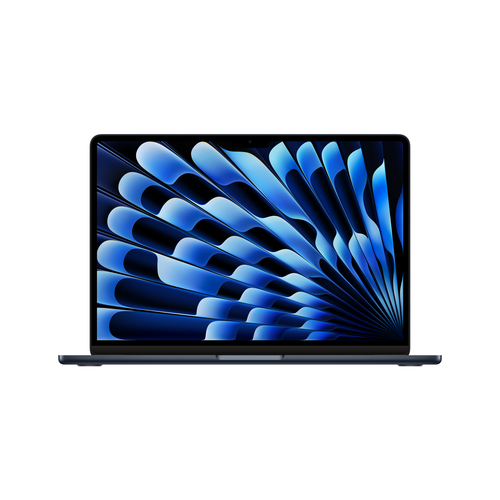
The MacBook Air M2 is poised to redefine what you expect from a laptop. Featuring a sleek, modern design and the impressive new M2 chip, this device is not just about looks—it's a powerhouse for both personal and professional use. Its performance and aesthetics make it a standout in a crowded market. If you're looking for details, the product page has you covered.
Unleashing the Power of the M2 Chip
The 8-core processor within the M2 chip brings a level of multitasking capability that feels almost effortless. You can be streaming your favorite shows, working on a complex spreadsheet, and editing high-resolution photos all at once—without skipping a beat. This chip isn't just about more power; it's about smarter power. Unlike its predecessors, the M2 chip combines efficiency with performance, saving on battery life while ensuring you don’t compromise on speed and agility. For those curious, you can find more about its specs on the product page.
Let's talk about the 8-core GPU. It's a boon for the visual enthusiasts among us—it often renders high-quality graphics with stunning clarity and is a practical choice for those venturing into graphic design or video editing. But it's not just about work. The GPU also provides smoother graphics when you're switching contexts or opening multiple apps, creating a seamless transition between activities. If you're interested in diving deeper into high-performance computing, check out this discussion on similar innovations.Design and Display Delight: Sleek and Stunning
While performance is critical, the MacBook Air M2’s 13.6" IPS LED display is equally captivating. With a resolution of 2560 x 1664 pixels, it often feels like your workspace just got an upgrade. Colors are more vibrant, details are crisper, and it's genuinely a pleasure for the eyes whether you’re editing photos or watching movies. It’s designed not just to perform but to please.
Professionals and creatives will find this display particularly appealing. Imagine a photographer reviewing high-resolution images or a designer tweaking intricate design details—the clarity offered by this screen is usually invaluable. And for everyday use, whether it's drafting an email or browsing social media, this display elevates all activities. For a nuanced look at design preferences, check out another perspective. Meanwhile, you could argue that its thin chassis and lightweight design further add to its appeal, especially for those constantly on the go.Staying Connected: Advanced Connectivity Features
In today's world, staying connected is more crucial than ever, and the MacBook Air M2 includes state-of-the-art connectivity features to help. With Wi-Fi 6, you're equipped for faster and more reliable internet connections, even in crowded networks. That means fewer buffering issues during online meetings or video calls, helping maintain your productivity without interruption. Meanwhile, Bluetooth 5.3 support doesn’t just allow quicker pairing with your devices—it enhances your interaction with peripherals and wearables, ensuring smoother data transfer and efficient communication. For detailed connectivity insights, feel free to explore further here.
Remote work scenarios illustrate the practical applications of these features vividly. Picture setting up a home office without worrying about configuration hassles or dipping connectivity mid-presentation. Or, imagine streaming a webinar in a bustling café without losing your connection. The possibilities are endless, and the productivity perks are terrific. Curious about the specifics of these connectivity perks? Visit the product page for more.macOS Sonoma: Navigating with Ease
The MacBook Air M2 comes pre-installed with macOS Sonoma, which is, in many ways, designed to be your daily digital assistant. This OS upgrade brings enhanced window management that organizes your chaos, allowing you to focus more on tasks rather than logistics. This can often boost productivity significantly, especially when managing multiple projects or bookmarks.
Sonoma’s seamless compatibility with a wide array of apps means you aren't shackled by software limitations. Whether you're a tech enthusiast pushing the boundaries of productivity apps or a casual user wanting a smooth digital experience, macOS Sonoma offers something for everyone. In my experience, maximizing the OS is about customizing your workspace. Practical tips include using mission control to manage desktops or integrating time-saving keyboard shortcuts you've always ignored. These handy tricks are there to make your life easier. Need more insights tailored to tech-aware audiences? Check out other similar systems to see how innovations play out in real-world use.Our Honest MacBook Air M2 Review
From its svelte design to powerful performance, the MacBook Air M2 certainly makes an impression. Its design and powerful new chip are undeniably pros that enhance both form and functionality. The advanced connectivity features further extend its utility for professionals and students alike. However, with all these premium features comes the caveat of cost—it's a financial commitment that not everyone may find easy to justify. For instance, a student might find it invaluable for fast online classes or extensive research assignments. In contrast, a professional might use it for stunning presentations and complex data analysis. In everyday use, it performs most tasks with aplomb but may struggle with heavy, specialized software requiring more storage. Still, this isn’t just a luxury; it’s a solid investment for those who need reliability fused with style.
How to Set Up Your New MacBook Air M2
Starting fresh with your MacBook Air M2? Begin by checking for software updates to keep macOS Sonoma running smoothly—ensuring you’re up-to-date is crucial for security and performance. As you set up your Wi-Fi, watch for signal strengths for reliable connectivity. Setting up Bluetooth for peripherals offers another layer of efficiency right off the bat.
In my experience, optimizing battery life should be a priority; adjust settings like screen brightness and enable energy-saving mode. These are little tweaks that significantly enhance the laptop’s life cycle. When installing apps, only choose those that enhance productivity—too many apps clutter and slow down your workflow. A common mistake? Forgetting to back up important data before transitioning or ignoring system prompts for OS updates. Avoid these pitfalls and, remember, your setup doesn’t have to be perfect from day one. It's about gradually finding what works best for your daily routine.Conclusion
The MacBook Air M2 shines in performance, aesthetics, and connectivity, making it a formidable competitor in the tech world. It’s a perfect match for students requiring a portable powerhouse or professionals needing reliable performance across various tasks—like detailed graphic editing or number crunching. But is it for you? Consider what you need in a device. Is design crucial, or is it performance that sets your heart racing? Reflecting on what truly matters can guide you to the right decision. For a deeper dive into features, you could swing by the product page. Ultimately, recognizing your requirements will lead to making the most informed choice regarding technology investments.
Frequently Asked Questions
Common questions about Apple MacBook Air Apple M M2 Laptop 13.6" 16 GB 256 GB SSD Wi-Fi 6 (802.11ax) macOS Sonoma Navy